
📱Web-app
Gratheon web app is intended to help beekeepers manage apiary data, communicate with installed modular hive devices, analyze frame and bottom-board images, store timeseries telemetry, generate alerts, forecast, and provide AI suggestions to solve issues.
status: TRL 6
Core domain entities
| Entity | Description | Key Properties |
|---|---|---|
| Apiary | Set of beehives located together at specific location. Size limited by surrounding land that bees can pollinate | Location (lat/lng), name, active status |
| Hive | Physical beehive structure with vertical sections. Can be split, merged, or collapsed | Name, color, status, boxes, family, split/merge history, collapse tracking |
| Family (Colony/Queen) | Bee superorganism led by queen that lays eggs | Race (apis mellifera variation), added year, age (auto-calculated), treatments |
| Box (Hive Section) | Hollow wooden section that houses frames. Types: Deep (brood), Super (honey), Gate (entrance), Ventilation, Queen Excluder, Horizontal Feeder, Bottom Board | Type, position, color, frames |
| Frame | Wooden frame with wax foundation inside sections. Types: Foundation, Empty Comb, Void, Partition, Feeder | Type, position, left/right sides |
| Frame Side | One side of a frame where photos can be uploaded for AI analysis | File references for images, detected resources |
| Inspection | Snapshot of entire beehive state during beekeeper intervention. Stores JSON data of hive composition at specific time | Hive ID, data (JSON), timestamp |
| Treatment | Anti-varroa chemical interventions tracked per family/box/hive for medical history | Type, timestamp, target (hive/box/family) |
| File | Uploaded images (frame photos, bottom board varroa photos). Processed through AI detection pipeline | Hash, dimensions, user ID, file type, detection jobs |
| Detected Resources | AI-detected cell types on frame photos: Capped brood, Eggs, Honey, Larvae, Nectar, Pollen, Other | Class, coordinates (x,y), radius, probability |
| Detected Bees/Queens | AI-detected bee and queen positions on frames | Bounding boxes, confidence scores |
| Detected Varroa | AI-detected varroa mites on bottom board photos | Count, positions (coming soon) |
| Metrics (Telemetry) | Time-series sensor data from IoT devices | Temperature (°C), humidity (%), weight (kg), timestamp |
| Entrance Movement | Bee traffic analysis from entrance video cameras | Bees in/out, net flow, speed stats, stationary bees, interactions |
| Alert | Generated warnings based on metric thresholds and rules | Text, metric type/value, hive ID, delivery status, timestamp |
| Alert Rule | User-defined conditions that trigger alerts | Metric type, condition, threshold, duration, enabled status, scope (hive/apiary) |
| Alert Channel | Delivery methods for alerts | Type (email/phone/telegram), contact info, time window, enabled status |
Main app use cases
Use-cases is a group of features that when combined serve a great value for the customer
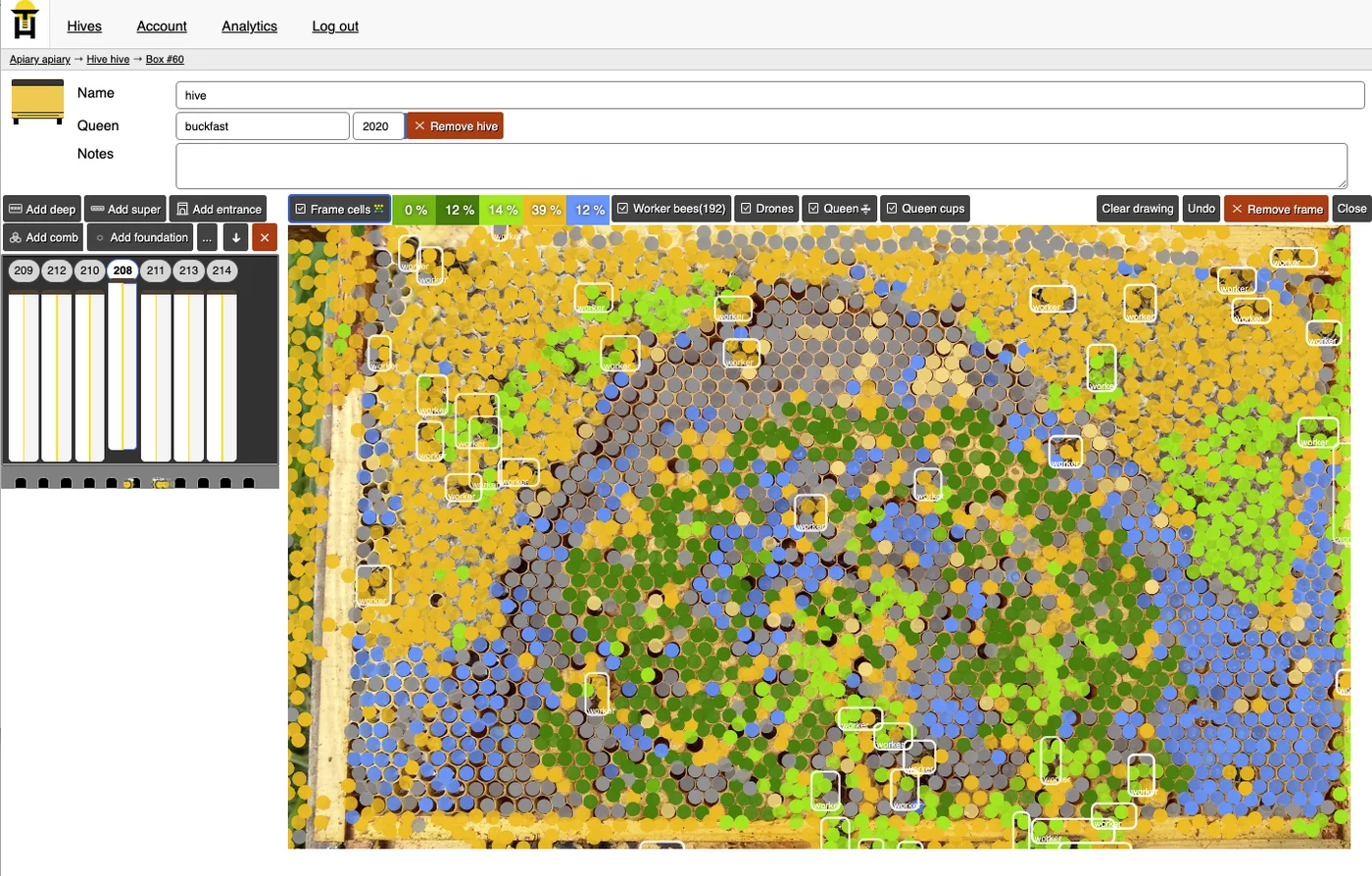
Uploading photos to get colony overview stats
- Create a beehive
- Open specific section, add frames
- Open a specific frame, click "upload frame photo" with bees and comb cells on it. See frame side management and inspection management.
- Wait for backend to process
- Receive AI-assisted statistics about bee counts and cell distribution
- Compare different hives to see which ones are more powerful with real data behind it
Track colony development over time
- Follow steps for adding frame photos of the beehive after an inspection
- Click on "Create inspection button" to create a snapshot of the hive in time
- Check that new Inspection is added under Inspections tab
- Check how over time each inspection has own distribution of resources
Sending weight telemetry from IoT sensors
- Generate API token in Account settings
- Power on IoT sensors device, follow beehive sensors docs to connect it to WiFi and send data
- Open target beehive, open Metrics tab and see graphs of weight/temperature
- Open Analytics tab to see data more time-bound and correlate it with other data like weather
Streaming entrance video
- Setup Entrance Observer camera to stream video
- Check that video stream is visible
Monitor varroa mites via bottom board
- Add a bottom board section to your hive
- Upload a photo of the white slideable panel showing varroa mites
- Images are versioned with inspections for historical tracking
- Hive bottom board varroa counting will provide mite counts and treatment recommendations